



You may think that using Snapchat at your event doesn’t really fit with your client’s (or your own) vision, but when used right, this platform can yield huge results.
Snapchat has fast become one of the leading social media platforms. With Facebook and Instagram now employing their own ‘stories’ feature, it’s easy to see why the app has taken the world by storm. It’s designed to allow users to share real-time ‘memories’ with their friends and followers. However, these images and videos also have a shelf life, with a snap only available for up to 10 seconds. Loved by Millennials and younger generations alike, the platform forces consumers into a position where they watch content or, lose it forever.
The power of FOMO
You should never underestimate the power of FOMO (Fear of Missing Out). The momentary feel of Snapchat provokes the audience into carrying out the desired action. If they don’t, they could potentially miss out on something good. FOMO is a powerful tool and one that can completely change the tides of your event marketing when done right. It creates addiction, people are constantly worried about missing out on fun or the next big thing.
The benefits
Snapchat boasts an impressive range of benefits. Not only can it improve attendee engagement, but it also allows for event planners to increase their live events reach. Moreover, compared to other marketing strategies and even some other social media, the platform can be used at little cost to the business. However, this will depend on how you use it (we’ll explain more on this later).
Additionally, the platform also has a huge capacity for gamification at events. Whether it’s using a scavenger hunt style game or having attendees share their best snaps on Twitter. You could even run a competition pre-event and have attendees design a filter, the winner has their chosen design set as the geo-filter for the event.
Speaking of filters….
All aboard the filter train
Filters can bring life to what may appear as an originally dull picture. By using different colours, lighting etc you can bring your snaps to life. This is also good news for businesses, through the use of custom filters, you can add branding as well.
There are three main types of filters:
Lenses: This filter recognises users faces and using augmented reality, overlays graphics. Whether you want to look like a puppy or a cat, this filter can provide users with hours of fun.
Geo-filters: These are location based filters. Art is used as a frame on either the top or bottom, however, they are only available within a specific geographical fence.
On Demand filters: These are very similar to geo-filters, however, they are limited to not only a location but also a time period. These are perfect for live events. Using an on-demand filter, you can increase attendance – attendees will only be able to use the filter if they are there. And, if they’re not, this will intensify their FOMO.
So, how do I make one?
Despite what you may think, creating your own filter is extremely easy. But, before you can dive straight in, there are some things you need to know. Firstly, there are different types of filters and each one comes with its own set of rules.
The first type is a Community filter. Community filters are for locations, public spaces and landmarks. Anyone can make them, however, they can not be branded nor use trademarked images.
The second type is a Personal filter. Personal filters can be used for weddings, birthdays, graduations – whatever you want! But again, they can not contain any business related branding or trademarks.
Finally, you have the Business filter. Unlike the other two filters, business filters can contain branding. However, you cannot use pictures of people, URLS or content that you don’t have permission to use. The business filter is what you’ll need to use for your event.
The fun part
Now that’s out of the way, let’s get to the fun part. Creating your filter. To begin, you need to have a Snapchat account. In order to do that, you’ll need to download the app, which is available on both iOS and Android.
Once you’ve created your account, head over to the Snapchat website. Here you’ll be able to choose whether you upload a design or create one. If you don’t have access to a graphic designer, making one through Snapchat is incredibly simple.
Once you’ve uploaded your filter, you then choose the date and time frame in which the filter will be available. Here, I have chosen for my filter to run from 6 PM on the 23rd to 3 AM on the 24th.

When selecting your dates, there are some things you’ll need to bear in mind. There are two factors that can affect the cost. The longer duration your campaign runs for, the more expensive it’ll be. The second factor is the size of your geofence, which leads us to the next step…
The third step is choosing your area where your filter will occur. The minimum geofence you can use is 20,000 sqft with a maximum of 5,000,000 sqft.
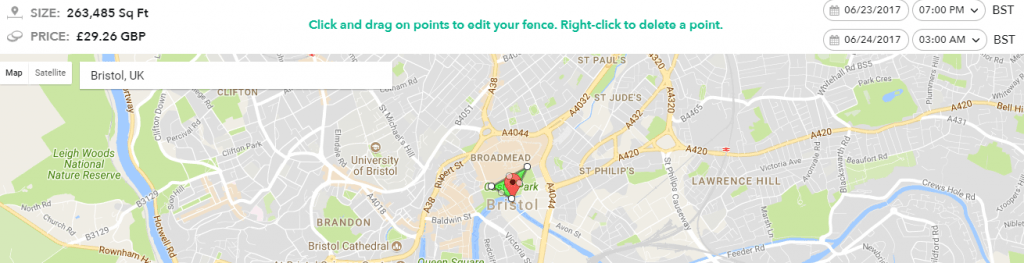
As you can see, here for a geofence the size of 263,485 sqft and the duration I set earlier, it comes to a cost of just under £30.00.
After setting your geofence, all that’s left is to submit your design for approval. This can take up to 2 business days, so be sure to give yourself enough time.
Now what?
Your design is ready to go, you just need to promote it. Ther’s no point designing a filter if nobody knows about it! This can be done using snap codes on any signage, incentives or sharing your code on social media.
Snapchat is huge right now, but it still has yet to cement itself in the world of live events. If you want to revitalise your event marketing, improve attendee engagement or simply want to just try something new, Snapchat could be your way to go.